Today Calendar Android App Review
You can find lots of calendar apps in Google Play Store, many of which have been derived from the stock calendar itself. Today Calendar for Android is also no different. But what sets it apart from the rest is the manner in which it combines high functionality with eye-catchy aesthetics. You can download Today Calendar app for free from Google Play Store.
Features
With Today Calendar for Android, tock calendar’s UI was completely overhauled to create the app. The old cluttered grey-on-grey layout was replaced with a clean themeable design to create a truly beautiful calendar app. Today Calendar app for Android has all the features you’ll come to expect in a stock calendar application. But most of those features are slightly modified and rebuilt from the ground up to increase performance and productivity. If you use the app, you’ll realize that it is easier to organize your tasks than in a typical stock Android calendar. For example, the month view has been redesigned to be Today Calendar’s All-In-One view. It combines both the month and agenda views of the stock calendar to allow the vast majority of users to plan and organize their agenda from a single view.
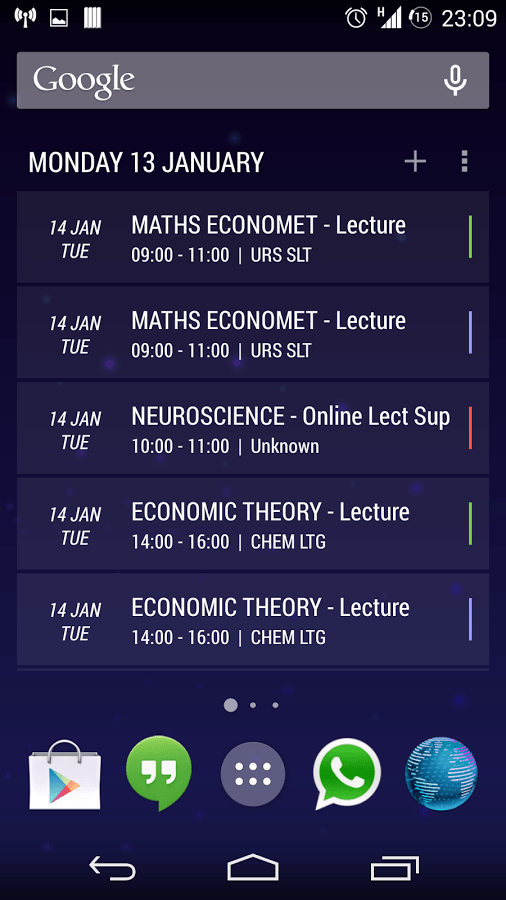
Users also get to customize the look and feel of Today Calendar app for Android. The color themes are appealing and easy on the eyes. The app also effectively syncs with the Google Calendar. Performance wise, Today Calendar for Android is pretty stable, slick and responsive. We’d never encountered any lags while testing the app. Today Calendar app requires Android OS 4.1 and up. The basic Today Calendar for Android app we reviewed here is free. But it also has a paid pro-version with added features.
Conclusion
Today Calendar app for Android is a worthy replacement to your stock Android calendar. It has got all the features of the stock calendar app, but with better aesthetics and design as well as better functionality. Its noteworthy feature is the combined month and agenda views that save you from having to switch between the two views. The color theme is easy on the eye. It syncs quickly with the Google Calendar. It is also stable. Check it out if you’re looking for a reliable calendar utility as a replacement for the stock calendar app in your Android device.
Category: Free Android Apps


