Image Reduce App for Android Review
Have you experienced a situation wherein you’d failed to upload an image to a social networking site because the file size is too big? Such scenario is quite common especially if you’re often sharing photos to various SNS and photo sharing sites from your phone. The only way out is to reduce the file size before attempting to upload again. Image Reduce app for Android helps you do just that. It automatically reduces the size and resolution of your photos thus making them easier to share. You can get Image Reduce Android app for free from Google Play Store.
Image Reduce App Features
Image Reduce app for Android provides a hassle free way to reduce the size/resolution of large images. It is pretty simple: you choose the images you want to resize and select the size that you want to send to the target device. You can opt to retain your image’s original orientation, file name and date-time. The best part is that you don’t have to explicitly call Image Reduce to shrink the image file size. Instead, you can open the photo of your choice from the image gallery or file manager, and press ‘share image’ button. Now choose the “Image Reduce and Share” option and pick your target image size and that’s it. All the size-reduced images are stored in the app’s “ReducedImage” folder. You can alternatively opt to put those in a custom folder of your choice. You can also choose multiple images to shrink at the same time.
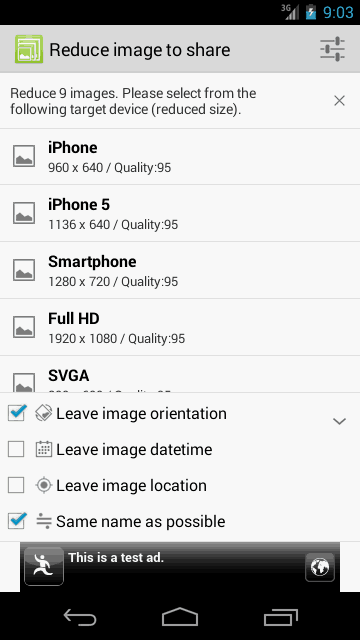
In terms of app performance, the image quality is OK. It does not look pixelated at all. The app is also pretty responsive and stable. It also has a built-in image viewer. Further, you can enhance your photos by applying some cool effects and filters.The app is compatible with Android OS 4.0 and up.
Conclusion
Image Reduce app for Android comes across as a useful tool for those who are frequently uploading photos to Facebook and the like. Using the app, it is pretty easy to resize the photos to bring within share-able file size. It supports multiple file types. The built-in image viewer and photo edit options comes handy. Performance wise, the app is pretty stable. Verdict: Worth checking out.
Category: Uncategorized


