SwiP ProfileSwitcher App for Android Review
Even though feature rich, Android strangely miss at least one feature that is found in feature phones: the ability to switch to various sound profiles other than silent mode and vibrate mode. SwiP – ProfileSwitcher App for Android let you create custom sound profiles, and a task automation/profile switcher utility. You can get SwiP app for free.
SwiP App Features
SwiP – ProfileSwitcher App for Android let you automate the tasks that you often perform in your phone (such as turning the WiFi or GPS on). You can also create your own custom sound profiles. Further, the app can enable each such profile based on triggers such as your location, battery status, or time. In other words, the app offers trigger-management wherein a trigger basically defines a rule for the automatic application of selected profiles. One is able to create said triggers and to use them for his daily workflow. Even though, the app is still in its beta stage, it performs commendably without any glitches or error.
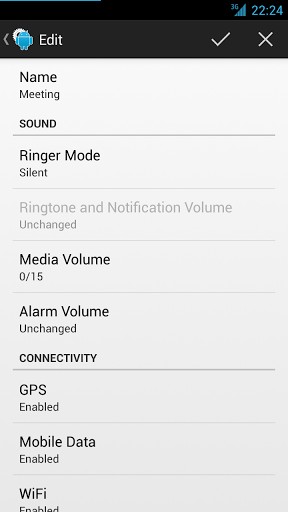
What most users would love about SwiP is its ease of use. It features a simple UI with two main tabs – one is for “Profiles” while the other is for “Triggers”. In the former, you’re permitted to create any set of customized settings. Said settings include various options for sound, volume, connectivity and display. When you open the app for the first time, it’ll have three profiles: default, home and meeting. You can add your own profiles by tapping ‘+’ button. From ‘Triggers’ tab, you can set new triggers. In comparison, the options in SwiP for Android may not be as advanced as Tasker. But it nevertheless does its job. It is pretty robust and responsive as well. SwiP app is compatible with Android OS versions 4.0 and up.
Final Thoughts
SwiP – ProfileSwitcher App for Android is an intelligent profile application. It might not be as sophisticated as Tasker. But it does its job perfectly, quite easy to configure, and hence a great app for starters. It is also pretty stable and responsive, the being in beta stage notwithstanding. The UI is pretty neat and easy to use. Hopefully, more features will be added to it in the coming versions. Verdict: A handy task automation and profile switcher app that helps you manage your phone in a more efficient and hassle-free manner.
Category: Free Android Apps


