File Expert HD with Clouds App for Android Review
The description in File Expert HD with Clouds app in Google Play Store page reads ‘It is an ultimate app for managing your files on your mobile phones, tablets, personal computers and cloud storage servers’. Let’s find out if those lofty claims are indeed true. You can get File Expert HD with Clouds app for free from Google Play Store.
File Expert HD App Features
On opening File Expert HD with Clouds app for Android, you’ll notice the tabs that remind one of the Chrome Browser. The main screen represents My Files that are stored in different locations in your phone. The app puts each file type in separate category so that it is easy to find the files you might be looking for. It also has a reliable search feature that let you search files in case you can’t find it easily in one of the categories. If you want to view the sources of these files, simply tap on the ‘Folders’ tab at the top and you can view the various storage mediums you have in your phone. The third tab, My Tools shows a variety of tools, from a cache eraser to a memory manager. The One Touch Clean feature takes care of deleting all rubbish – such as cookies, temps and clipboard records – that you have accumulated in your phone during every day use. The app deletes them in a simple button click quickly. The Memory Manager comes handy in allocating memory to select services.
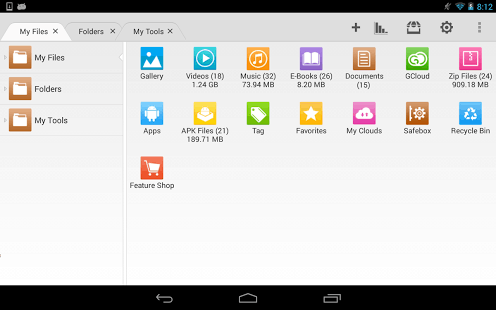
What makes File Expert HD with Clouds Android app different is the extra functionality it comes with that you might not find in other file managers. One such feature is the “Share My Content” tab that enables local content to be shared via a variety of methods from DLNA to FTP. Further, you can view files that are shared on the network. Different methods are built into the app including FTP, SFTP, SMB, and Bluetooth. It also comes with a powerful text editor and image viewer. File Expert HD for Android also works seamlessly with different cloud services such as Dropbox and SkyDrive.
Conclusion
File Expert HD with Clouds app for Android packs a whole set of features that let you manage your files in your phone, in the network and in the cloud. It let you find your files easily, automatically categorizes your files, and has a reliable search feature to search files by its name. Cache eraser and Memory Manager utilities comes handy. The clean and easy to learn UI stands out. Verdict: A feature-rich file manager app worth checking out.
Category: Free Android Apps


