Texpand – Text Expander Android App Review
Do you happen to type the same text repeatedly throughout the day? If yes, check this one out: Texpand – Text Expander app for Android. It is essentially a text expansion app that could save you time by using shortened forms of your frequently typed texts. Texpand – Text Expander app could be downloaded free of cost from Google Play Store.
Features
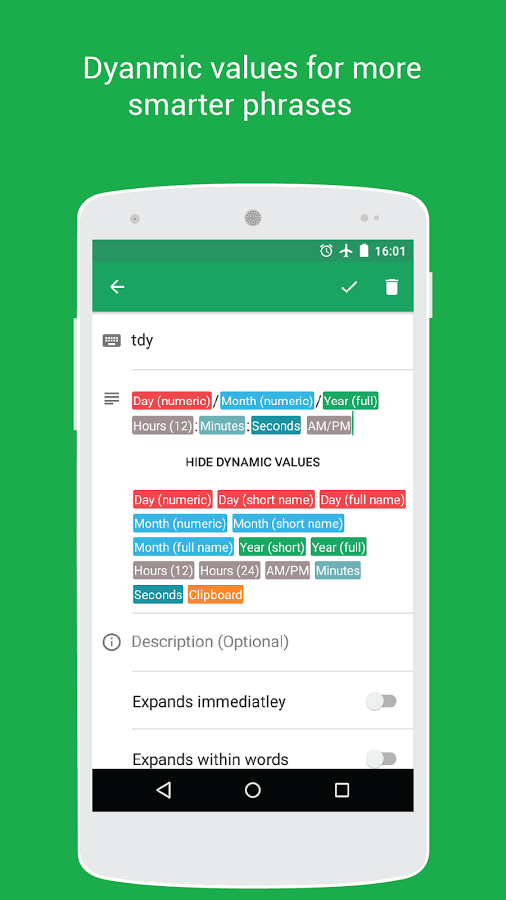
Texpand – Text Expander app for Android allows you to define short phrases for your frequently typed texts, and thereby save thousands of keystrokes, that otherwise you would have performed, and most importantly save time. You can set smart phrases with dynamic values (macros) for date and time, sort your phrases by usage count, shortcut name, and last used time, or search out desired phrases. The bottom-line is that using the app will improve your productivity many times. At present, you can save up to ten phrases. For unlimited number of phrases, you got to upgrade to the pro-version of the app. The pro-version of the app also comes with a floating window to let you complete your expansion and the option to backup and restore you phrases to/from Google Drive or your local storage.
Texpand – Text Expander app for Android works with almost all apps that require typing. But in case, if you don’t want the text expansion feature for some app – Hike Messenger for example – you always has the option to exclude it from the list. More specifically, just go to Settings > Exclusions and click the plus (+) button then choose the app you want excluded from the list. The app is found to be slick and responsive. Currently input fields on webpages are not supported. It also does not work on password fields. But that is understandable as passwords are proprietary and grammar has the least role in defining a password.
Conclusion
Texpand – Text Expander app for Android basically allows you to save your time by using shortened forms of your frequently typed texts. It is easy to set up the phrases for usually used words as well as dates. Texpand works with most apps. You always have the option to exclude the apps that you don’t want Texpand to help you out with. It however does not work with webpages or any other app that uses non native text fields. Check it out if you tend to type lots of emails/text messages daily on your phone.
Category: Free Android Apps


