Connections Android App Review
Connections app is an offering from Microsoft Garage – MS equivalent of Google Labs. It helps you manage your interactions with your contacts. You can download Connections for free from Google Play.
Features
Connections app for Android helps you better manage your relationship with your contacts – be it friends, family, customers, vendors or suppliers. It helps you capture and surface important information in context so that you can be better organized and prepared. The app allows users to categorize contacts into groups using tags. There is an optional panel that let you view all the contacts grouped under a tag. The biggest advantage of Connections app for Android is that it works for both your professional and personal requirements. For example, if you want to remind a friend on weekend plans the next time you speak over the phone, or would like to remember to update your boss on the current project status next time you are on a call, the app will come handy. The app allows users to add customized notes against contacts. So, the next time you receive a call, the Connections app icon pops up and it reveals the note on clicking on it. Further, at the end of the call, the icon let you quickly add notes on the particular call. It is even possible to place an image in the note, or add a reminder against a contact.
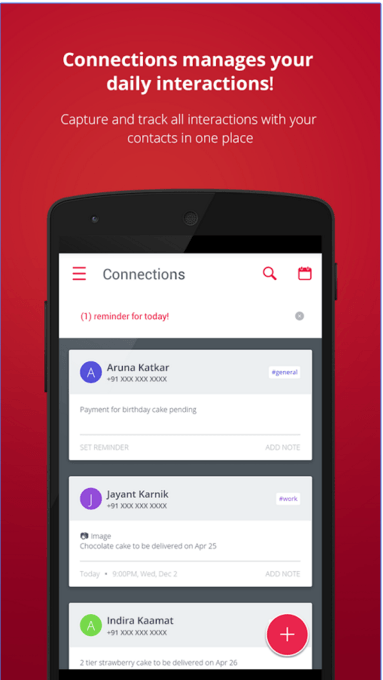
Connections app for Android provides a single place to call or message a contact. You can choose between the default messaging app and other popular messaging apps installed in your phone. But while reviewing, we did not find Skype call/messaging and WhatsApp call in the application. But they’re available in the default contact card. Connections for Android use the material design to organize contacts. The icon is prominent on the screen, yet non obtrusive when a contact calls in. Navigation is intuitive.
Conclusion
Connections app for Android does its job neatly, and effectively. It has certain features available in typical CRM, even though it is not CRM. The app is user friendly. Setting up the notes or categorizing contacts is easy. The UI layout is intuitive. The app is also stable and responsive. Overall, a productivity app that let you better manage your relationship with your contacts.
Category: Free Android Apps


Hello there! I could have sworn I’ve been to this blog before but after checking
through some oof the post I realizwd it’s new
to me. Anyhow, I’m definitely glad I founjd it aand I’ll be book-marking and checking back often! https://Glassiuk.Wordpress.com/