Loader Droid Download Manager Android App Review
As the name suggests, Loader Droid is a download manager tailor made for the Android platform. It helps you manage files – well, virtually any files – from the internet. The app can be obtained for free.
Features
Loader Droid Download Manager app for Android, like all download managers, is not directly integrated with any browser. The user interface is a bit unpolished. When you fire it up for the first time, the interface looks rather intimidating, and there is no real help at hand other than the ‘Tips and Tricks’. But you don’t have to worry much about all these as the app turned out to be rather simple to use. On the left side there are various file types, like images or audio, that can be used to easily organize downloaded files. Downloading files can be a bit tricky depending upon the file type you’re attempting to access. We found that images, at least in Firefox browser, take a long press and select ‘open with an app’ section. Usually, downloaded files – for e.g., zip files – will have a pop-up asking which app to use to download the file. Everything else will likely try to open in the browser. Loader Droid Download Manager app comes with its own browser and this solves many problems with the standard Android Browser, which sometimes fails to download certain files.
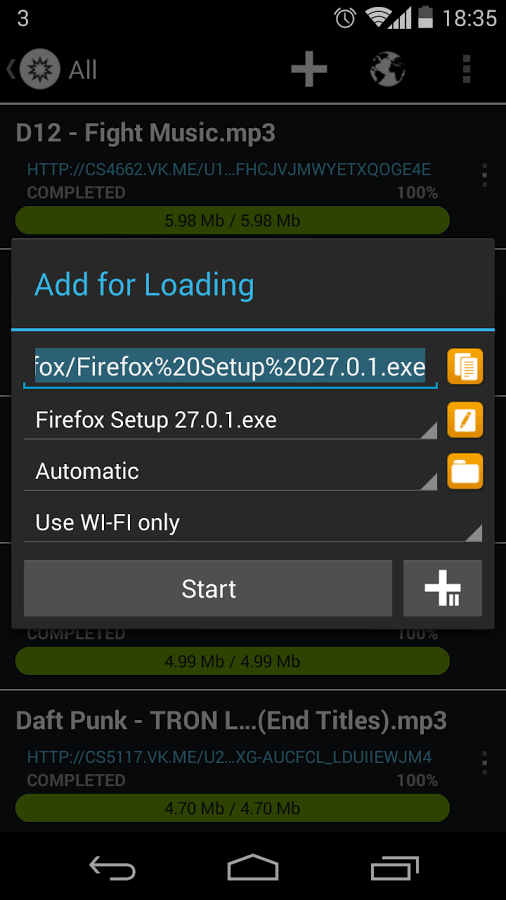
It should be noted that the downloads are resumable. That is, you can continue your downloads from the same place it was interrupted. The download auto pauses when the connection is lost, and automatically resumes, when the internet connection is restored in your device. The user interface has nothing special to note. But it works. The notification bar progress interface allows you to schedule downloads and stay informed on the download progress in real time. Being a free app, there are those annoying banner ads at the bottom of the screen. But you can get rid of them for $2.99.
Conclusion
Loader Droid Download Manager app for Android is a full-fledged download manager that helps you download multiple file types and keep it organized in your phone. It facilitates faster downloading by splitting the download into parts. The downloads are resumable processes and this comes handy if your internet connection is less reliable. The app comes with its browser. The UI is plain, but functional. The app is also pretty stable and responsive. Check it out if you’re looking for a reliable download manager.
Category: Free Android Apps


