Alto – Email Organized for You Android App Review
Alto for Android is an email app from AOL. It has all the typical features of an email app, plus some Alto specific ones as well. While it shares many features with Google inbox, it does not try to reinvent the wheel. At the core, Alto remains an email app and a pretty good one. You can download Alto for free from Google Play.
Features
Alto – Email Organized for You Android app has all the typical email app features such as threaded conversations, swipe-to-archive gesture (with multi-touch support) and a combined inbox. In addition, it has intuitive organizational tools and features like Cards and Stacks that automatically highlight the most important and timely information. More specifically, Alto mail scans your emails to pull flight and shipment details so that you can view the status of your next flight or incoming package on the Dashboard screen. As in Google Inbox app, these cards will be added in your inbox messages as well. Another notable feature of Alto for Android is email filtering. It provides multiple ways to filter your email messages. Like in other email apps, you can choose to view only your starred or unread messages. Further, you can see all your photo attachments without having to scroll through all the messages. You can also get a list of emails with file attachments. It even has a ‘personal’ folder that includes email only from people you know.
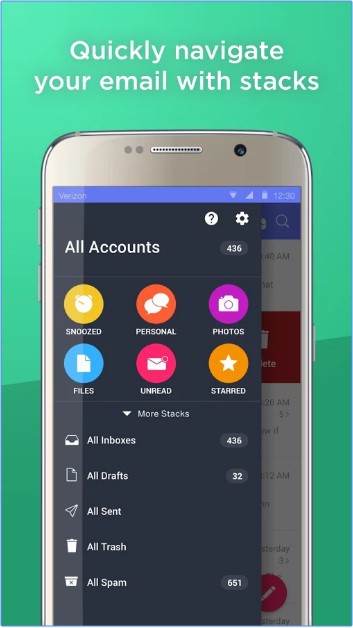
Alto app for Android allows to ‘snooze’ your email messages. You can customize your snooze time and answer messages when it’s most convenient. Further, users can customize the swiping gesture to archive, delete or snooze an email as per their preferences. Alto also supports multiple languages, which non-English speakers will certainly appreciate. If there is one little downside, it is Alto’s search feature, which has some room for improvement. We found the app to be pretty stable and responsive as well. Alto email app requires Android OS 4.1+.
Conclusion
Alto for Android is a well rounded email app that provides user with an organized email inbox. It has all the typical email app features, plus Alto’s own innovative Cards and Stacks and automatic filtering of emails into separate categories. The UI layout is user friendly. Multiple language support comes handy to non-English speakers. Its search feature has some room for improvement though. Overall, a reliable email application with some niche features. Check it out if you’re scouting for one.
Category: Free Android Apps


