Open Signal Maps App for Android Review
Do you think that poor signal strength is one of the reasons why calls drop in your work place or near your home? Changing the service provider might sound a better solution. But before taking the final step, it is worthwhile checking the signal strength at the place where you live, and also check the direction of the nearby tower/the various towers of your provider in your immediate vicinity. Open Signal Maps app for Android helps you to do just that. Open Signal Maps application is a free download from Android Market.
Features of Android Open Signal Maps App
Open Signal Maps has a file size of 1.3 MB. So it goes without saying that it won’t trouble your RAM.
Open Signal Maps got a very readable user interface. On firing up the Open Signal Maps application, you’ll see a prominent signal meter, which shows the signal strength graphically alongside its value in percentage, and a pointer (under overview tab that gets selected by default). The pointer points to a direction of the tower providing the maximum signal strength. Tapping on the ‘I’ icon at the bottom right gives detailed info such as the tower you’re connected at the moment, signal strength, connection type, network, tower latitude/longitude, and distance of your phone from the tower. On the bottom left is a button for WiFi mode.
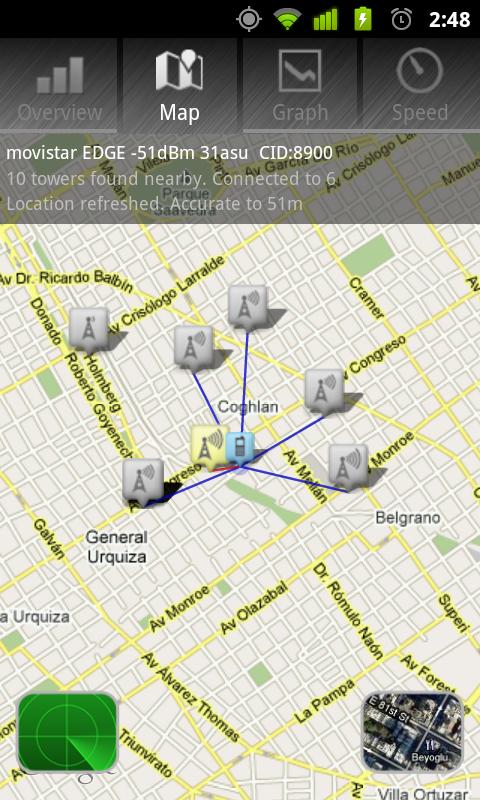
The second tab shows ‘Map View’. This shows on a Google Map, the tower from which you receive the strongest signal and a red line connecting your phone location to the said tower. On bottom right are shown layers to display satellite pictures and radar view. What is the latter for? It is a question worth asking.
The next tab, ‘Graph’ gives the history graph of the signal strength on a minute scale. It goes without saying that it will be all over the place for most people, even if you stand still in the same place for the given time duration. In the setting, there is an option to allow logging to continue in the background, albeit at the cost of some battery. That helps you to view the history over slightly longer periods of time. The fourth tab is ‘Speed’ that lets you test the 3G speed.
Final Thoughts
Open Signal Maps app for Android is a handy application, especially when you’re in areas with poor signal strength. The app tells you as to which part of the building you need to locate yourself to catch maximum signal strengths. The user interface is well laid out, and the app is user friendly for most parts. Verdict: worth trying.
Category: Free Android Apps, Free Android Tools


Cool
how can i download this app
Its such as you learn my mind! Yoou appear to know so much about this, such
as you wrfote the book in it or something.
I think that you could do with some p.c. to forrce the message house a bit, but instead of that,
this is fantastic blog. A fantastic read. I will
definitdly be back. https://fortune-Glassi.Mystrikingly.com