PicCollage Android App Review
PicCollage for Android provides a great way to show off your photos. Using the app, you can combine a group of photos to an image file. It is also perfect to go with your holidays, thanks to its exclusive holiday content. You can download PicCollage app for free from Google Play Store.
Features
PicCollage app for Android allows users to create a variety of collages – a freestyle collage, a grid layout or one with a theme – for example. In grid layout, your photos will be arranged in a grid format. You have numerous grids to choose from to make said collage. In freestyle collage, you are free to lay out the photos in any way you please, and rotate and resize them at will. You can also choose from a variety of themes such as Xmas, New Year and other holidays for your collages. Apart from photos, users may add text and videos to the collages. You can also add stickers to your collages. Strangely, you can’t add captions, which is a downer. PicCollage for iPhone also features a built-in photo editor. For example, users can adjust photo lighting, color, orientation, add blur and give other effects to the images. Once done with editing, the collages can be shared your friends and followers on Instagram, Facebook, Twitter, and iMessage, or via email. You also got the option to print your collages into greeting cards and send to your loved ones.
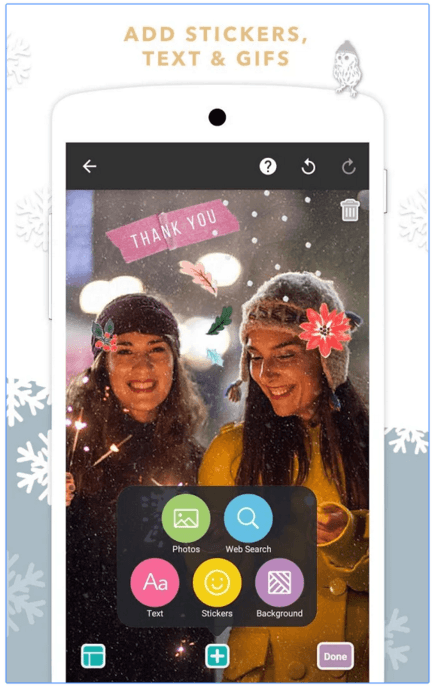
The UI of PicCollage is user friendly. You just got to tap on a photo or the collage background to open a small box of pertinent options and tools. The undo/redo buttons can be found at the top of the interface. It is also easy to delete the collages and stickers – by swiping them to the bin icon at the top. PicCollage is a free app. The watermarks that appear on the images post editing can be removed through a $1.99 in-app purchase. IAP is also required to unlock some of the clip shape options.
Conclusion
PicCollage app for Android allows you to quickly set up a variety of collages for your photos. It also got extensive options to set up special occasion themed collages. The images you wish to add to a collage can be imported from the gallery, or from SNS such as Instagram or Facebook. UI layout is user friendly. It won’t take long to get around its features and options, even for a first time user. The app is also largely stable and responsive. Check it out if you’re scouting for a reliable collage maker.
Category: Free Android Apps


I visit each day a few websites and blogs to read articles, bbut this blog
presents feature based writing. https://glassiindia.wordpress.com/