System Activity Monitor App for iPhone Review
Those who’re worried about the performance of their iPhone may check this one out: System Activity Monitor app for iPhone. It keeps a close eye on your iPhone’s memory usage, battery life, storage space, and running processes and updates you of the same. The app can be downloaded for free from iTunes.
Features
System Activity Monitor app for iPhone is a comprehensive all in one health check app. It monitors memory usage, battery performance, device information like IP address and hardware address, and used space on the iOS device, and provides a unique Dashboard view for the users. By knowing the iPhone resource info, you can optimally use the device for enhanced performance. The user interface is gorgeously designed. The color theme is attractive. Memory usage is beautifully portrayed on a percentage scale that is easy to read. Memory statistics provide an easy peep into the current memory usage in your iPhone. The used/free memory depiction in the form of a pie-chart comes handy. An LED indicator with BLUE, GREEN, YELLOW and RED colors indicates the severity of memory being used.
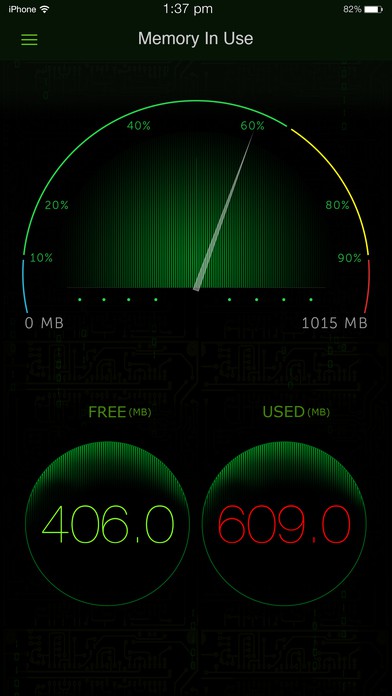
The battery charge remaining in the iPhone battery is also depicted in a beautiful animation. You can tap the battery on the fill, to show the detailed break up of battery availability for 3G talk time, browsing, videos, games etc. The app also shows device information such as system information, camera information, display, hardware and physical characteristics. It also shows whether you device is connected to Wi-Fi or cellular and its IP address. We found the data being displayed by the app to be fairly accurate. The app is also stable and responsive. System Activity Monitor app requires iOS versions 8.0 or higher.
Final Thoughts
System Activity Monitor app for iPhone provides detailed information on your iPhone’s performance indices. You can easily switch between views via tabs at the bottom of the screen. Further, you can catch a more detailed look at your memory and battery usage with a double-tap. Also, it provides information such as your iPhone’s UDID, IP address, MAC address, last boot time, and iOS version. The UI design is beautiful and easy to read. The app is also slick and responsive. Check it out if you are in the lookout for a utility app that keeps a close eye on the activities going on inside your iPhone.
Category: Free iPhone Apps


