Notable Quick Reminder App for Android Review
Android got a good notification tray to alert you about all activities/events that are going on in your device. However, there aren’t many apps that let you create custom notifications. The present app that we’re reviewing – Notable: Quick Reminder for Android – let you create personal reminders that sit in Android notification tray. You can get Notable Quick Reminder app for free from Google Play Store.
Notable Quick Reminder App Features
Notable Quick Reminder app for Android let you quickly create custom notifications that’ll serve as your personal reminders. The app puts an icon on your notification tray, and you only need to tap on it to create new notifications. A temporary overlay appears on the screen, letting you type your reminder quickly and select an icon color, before returning to whatever you were doing earlier. The icon is a single check mark that comes in four colors: white, green, orange and red. Once you create the reminder, it is pushed to the notification tray. Simply tap on the icon to edit/modify the created reminder.
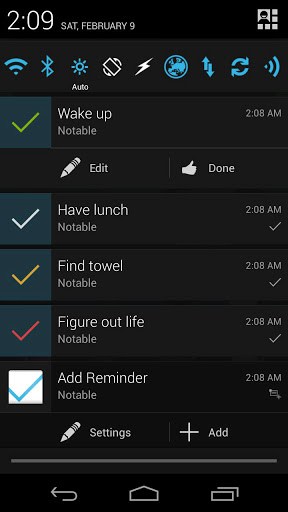
From settings, you can choose what happens exactly when you tap on the icon on the notification tray. You can opt to dismiss it, navigate to a detailed screen, or edit them. This option determines how the notifications are handled by the app by default. Further, you can enable/disable the notification icon, allow gestures or display expandable buttons. Using gesture support, you can simply swipe across the screen to mark a reminder as finished/completed or to dismiss it. And of course, Notable Quick Reminder Android application has voice dictation support. If you don’t want to type, simply tell the app what to do.
It should be noted that Notable: Quick Reminder for Android runs in the background all the time, and it uses 21 MB RAM, which is a bit on the higher end. The app is compatible with Android OS 2.1 and up.
Conclusion
Notable Quick Reminder app for Android is simple, yet useful. Not too often you’ll find an app made just right as this one. There are no annoying ads or features to unlock. Above all, it is pretty easy to create new reminders and it does not affect anything else that you’re doing on your phone at that moment. Verdict: If you are looking for a utility to display custom reminders in your notification tray, try Notable: Quick Reminder.
Category: Free Android Apps


You can definitely see yoour skills inn thhe
article you write. The arena hopes for even more passionate writers like you who are not afraid too say how they believe.
All the time follow your heart. https://Yv6bg.mssg.me/