Polarr Photo Editor iPhone App Review
Polarr Photo Editor for iPhone is a full-fledged photo editing app that offers advanced auto-enhance tools and sophisticated filters to edit every detail of your photo. It got almost all the features you get in the Mac version of the app. Polarr Photo Editor app can be downloaded for free from iTunes App Store.
Features
You can do virtually anything to your photos using Polarr Photo Editor app for iPhone. For example, you can wist it, flip it, or turn your photos upside down, not to mention the ability to select a size from the list, change the angle or crop the photo at will. Further, you can adjust the color, light, curves, and toning. The app comes with a rich collection of filter effects such as lens fringing, pixelate, or grain size, each with its own setting. Of course, you can create, customize, and share your own filters. The app allows you to edit the photographs in portrait or landscape mode depending upon your preferences. A big positive of Polarr Photo Editor app for iPhone is the ability to customize the interface to user’s requirements. You can easily drag and drop menu items to where you want them. Simply long tap to select and drag to rearrange icons.
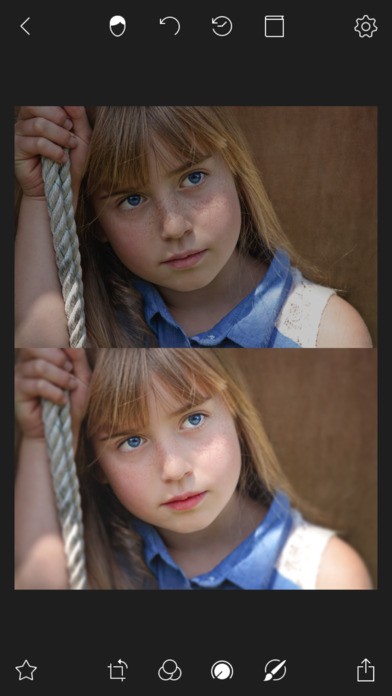
Of course, users can adjust the brush sizes and types as required. It also features complete set of color masking and brushing tools Other notable features include Dehaze and Denoise tools and multi-face detection and auto-detection of multiple facial features as well as photo extension.
The UI of Polarr Photo Editor app is beautifully designed. The layout is user friendly and easy to navigate. Choosing the suitable brush size or picking a filter to apply on the photos is layman’s job. You don’t have to be a photo editing expert to use this app. Multi-language support comes to the aid of non-English natives.
Conclusion
Polarr Photo Editor is a well rounded photo editing suite that let you touch up your photos quickly and easily. By customizing the interface, you can pre-arrange the features you want to have at your finger tips for editing photos. The UI layout is user friendly. The app is also stable and responsive. Users who want more features can avail them through in-app purchases. Check it out if you’re open to trying out new editing tools.
Category: Free iPhone Apps


