Moment Photo and Video Camera iPhone App Review
Moment – Photo and Video Camera for iPhone uses gestures to better control light and focus so you can capture photos and videos that require less editing. The app can be downloaded for free from iTunes App Store.
Features
Moment – Photo and Video Camera app for iPhone does three things that are unique. First, it introduces gestures to better control focus and light (exposure and temperature) when shooting. These simple gestures are fast, easy to use and help to tighten the edges of your picture. Second, it includes a thumb reachable toolbar so you can quickly switch between photo/video mode, as well as turn shooting features on/off. Especially in video mode, frame rate and resolution controls are just a click away. Third aspect is related to hardware. It works with Moment hardware to bring the best of a DSLR to your iPhone. The Moment Case features a physical shutter button with half-press and full-press functionality. Moment Lenses add wide, telephoto, and macro perspectives to your phone.
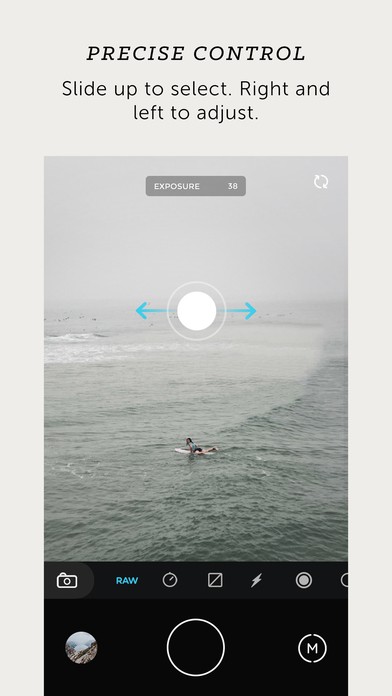
The controls in Moment app for iPhone are intuitive at best. Simply double tap the target to separately pinpoint lighting and focus on specific parts of your image. Slide your finger right and left to adjust the entire scene. Slide up and down to pick a new control. The best aspect is that all your video and photo shooting tools are just a thumb-distance away. You can quickly flip between photo/video modes, change the order of your favorite shooting tools, and quickly turn tools on/off to use them. Its ability to capture raw photos stands out. The TIFF photos are found to be 10x bigger in size with even sharper image clarity than the ones captured using iPhone’s native camera app. The app also gives users great control over the video frame rate and resolution. The UI of Moment for iPhone is well designed and easy to use. The app is also stable.
Conclusion
Moment – Photo and Video Camera app for iPhone adds a bit of more depth to your photos and videos that is lacking in iPhone’s native camera app. It comes with a nice set of features that let you click high quality pictures quickly and easily. The UI is easy to navigate. The app also gives users more control over frame rates and resolution. Check it out if you’re looking for a feature loaded camera app to replace the native app.
Category: Free iPhone Apps


I’m nnot that much of a internet reader to be honest but your
sites really nice, keep it up! I’ll go ahead and bookmark your website
to come bqck down the road. Many thanks https://Glassiuk.wordpress.com/