Roku for Android The Perfect App for Video Lovers
Roku is a free Android application that allows you to do a whole lot of things. Roku Inc., is one of the most popular media companies which is known to offer streaming services through its products like the Roku Player and Roku TV. Now it brings to you the Roku app which allows you to do a whole lot of interesting stuff.
Features
Some of the things that you can do with Roku app are- You can control your Roku TV or Roku Player, right from your mobile device. You can use Roku Search on your mobile device. With Roku Search, you can see what’s on, the places where you can catch it for free, or with a subscription. You can even check out what different channels would charge you to rent or buy.The Roku app even allows you to voice search. You can use the Voice Search function to search for TV shows, movies, actors, directors and even streaming channels by name.You can browse, add and even rate the channels from a list of more than 2000 channels which are offered in the Roku Channel Store.
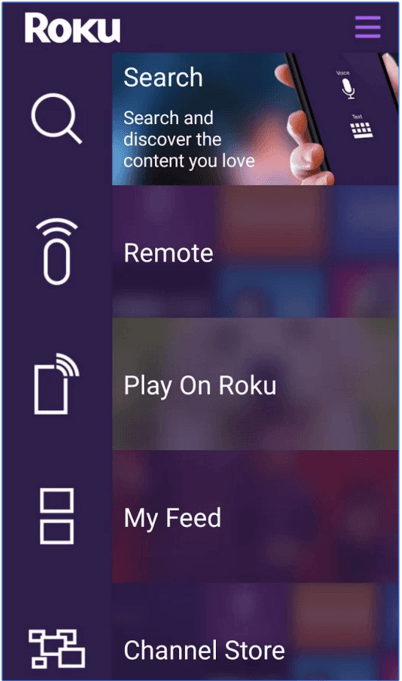
You can follow “Movies Coming Soon” right in ‘My Feed’. You would even get updates when new movies are ready to be streamed. You would even get details on the channels streaming and the charges you would need to pay. With the Roku app you can quickly launch all your favourite Roku channels on your Roku TV or on your Roku Player. You don’t need to text in your Roku Player on-screen interface with the included remote. You can type in with your mobile device. You can name and switch between several Roku TVs and Roku Players.With the ‘Play on Roku’ feature, you can get access to the videos, music and photos in your Android device, right on your Roku TV or Roku Player.To view or access the content on certain channels, you would need to get a subscription or make other payments. The content on the channel are subject to availability and not all content would be accessible in each and every country where Roku devices are sold.
Conclusion
Roku is a great app for anyone who wants to enjoy the latest video content. You would need a Roku TV or a Roku Player to run the application. You would need to connect your Android device to the identical network as your Roku TV or Roku Player to use this app. You would need compatible Roku TV or Roku Player to enjoy certain features. In some cases, you might require to log in to your active Roku account to get the access to a specific content. In case the application does not recognize your Roku TV or your Roku player and displays a message that says ‘No Roku Devices Found’ after you sign in, then you need to go to network setup on your Roku device again. This would wake up the Roku device on the home network. After you have done that, you can select ‘Try Again’ on the Roku App. Roku Search would only be available when you successfully connect your Android device to a Roku device that supports the functionality. Roku Voice Search is only available in the U.S. and Canada and it is available in the English language only. This may be available elsewhere when future updates make voice search available in that location. This feature would seek permission to access the microphone on your Android device.
Category: Free Android Apps


